using System;
using System.Collections.Generic;
using System.Security.Claims;
using System.Security.Cryptography.X509Certificates;
using System.Security.Cryptography.Xml;
using System.Xml;

namespace UI.Business.SAML
{
    public class SamlService
    {
        private XmlDocument _samlXmlDocument;
        private XmlNamespaceManager _manager;

        public void LoadXml(string xml)
        {
            _samlXmlDocument = new XmlDocument {PreserveWhitespace = true, XmlResolver = null};
            _samlXmlDocument.LoadXml(xml);

            LoadNamespaceManager();
        }

        public void LoadXmlFromBase64(string response)
        {
            System.Text.ASCIIEncoding enc = new System.Text.ASCIIEncoding();
            LoadXml(enc.GetString(Convert.FromBase64String(response)));
        }

        private void LoadNamespaceManager()
        {
            _manager = new XmlNamespaceManager(_samlXmlDocument.NameTable);
            _manager.AddNamespace("ds", SignedXml.XmlDsigNamespaceUrl);
            _manager.AddNamespace("saml", "urn:oasis:names:tc:SAML:2.0:assertion");
            _manager.AddNamespace("samlp", "urn:oasis:names:tc:SAML:2.0:protocol");
        }

        public bool IsValid()
        {
            bool status = false;

            // The date is skew to allow the idp clock and this server click to be abit out of sync without failing the validation.
            var skewDateForValidation = DateTime.Now.AddSeconds(20);

            XmlNodeList nodeList = _samlXmlDocument.SelectNodes("//ds:Signature", _manager);
            if (nodeList != null)
            {
                status = true;
                SignedXml signedXml = new SignedXml(_samlXmlDocument);
                signedXml.LoadXml((XmlElement) nodeList[0]);

                status &= signedXml.CheckSignature(GetCertificate(), true);

                var notBefore = NotBefore();
                status &= !notBefore.HasValue || (notBefore <= skewDateForValidation);

                var notOnOrAfter = NotOnOrAfter();
                status &= !notOnOrAfter.HasValue || (notOnOrAfter > skewDateForValidation);
            }

            return status;
        }

        public X509Certificate2 GetCertificate()
        {
            using (var store = new X509Store(StoreLocation.LocalMachine))
            {
                store.Open(OpenFlags.ReadOnly);
                X509Certificate2Collection certs = store.Certificates.Find(X509FindType.FindByIssuerDistinguishedName,
                    "L=Sachsen, CN=www.staffbase.com, O=Staffbase GmbH, C=DE", false);

                return certs.Count > 0 ? certs[0] : null;
            }
        }


        public DateTime? NotBefore()
        {
            var nodes = _samlXmlDocument.SelectNodes("/samlp:Response/saml:Assertion/saml:Conditions", _manager);
            string value = null;
            if (nodes != null && nodes.Count > 0 && nodes[0]?.Attributes?["NotBefore"] != null)
            {
                value = nodes[0].Attributes["NotBefore"].Value;
            }

            return value != null ? DateTime.Parse(value) : (DateTime?) null;
        }

        public DateTime? NotOnOrAfter()
        {
            var nodes = _samlXmlDocument.SelectNodes("/samlp:Response/saml:Assertion/saml:Conditions", _manager);
            string value = null;
            if (nodes != null && nodes.Count > 0 && nodes[0]?.Attributes?["NotOnOrAfter"] != null)
            {
                value = nodes[0].Attributes["NotOnOrAfter"].Value;
            }

            return value != null ? DateTime.Parse(value) : (DateTime?) null;
        }

        public List<Claim> GetStaffbaseClaims()
        {
            var claimsNs = "http://schemas.xmlsoap.org/ws/2005/05/identity/claims/";
            var nameId = GetCustomAttribute(claimsNs + "nameidentifier");
            var givenName = GetCustomAttribute(claimsNs + "givenname");
            var surName = GetCustomAttribute(claimsNs + "surname");
            var workplaceCode = GetCustomAttribute("arbetsplatskod");
            var occupationCode = GetCustomAttribute("yrkeskod");
            var employeeNumber = GetCustomAttribute("employeeNumber");

            var claims = new List<Claim>();
            if (!string.IsNullOrWhiteSpace(givenName) || !string.IsNullOrWhiteSpace(surName))
                claims.Add(new Claim(ClaimTypes.Name, $"{givenName} {surName}"));
            if (!string.IsNullOrWhiteSpace(nameId))
                claims.Add(new Claim(ClaimTypes.NameIdentifier, nameId));

            // Used as a validation that the user we get in claims is an AD user. If not we do not give it the role "Intranet user"
            if (!string.IsNullOrWhiteSpace(employeeNumber))
                claims.Add(new Claim(ClaimTypes.WindowsAccountName, employeeNumber));
            // Set to workplace code is set to Upn claim because the rest of the site depends on it there
            if (!string.IsNullOrWhiteSpace(workplaceCode))
                claims.Add(new Claim(ClaimTypes.Upn, workplaceCode));
            // Set to occupationcode code is set to surname claim because the rest of the site depends on it there
            if (!string.IsNullOrWhiteSpace(occupationCode))
                claims.Add(new Claim(ClaimTypes.Surname, occupationCode));

            return claims;
        }
        public string GetCustomAttribute(string attr)
        {
            XmlNode node = _samlXmlDocument.SelectSingleNode("/samlp:Response/saml:Assertion/saml:AttributeStatement/saml:Attribute[@Name='" + attr + "']/saml:AttributeValue", _manager);
            return node?.InnerText;
        }

        public string GetNameId()
        {
            XmlNode node = _samlXmlDocument.SelectSingleNode("/samlp:Response/saml:Assertion/saml:Subject/saml:NameID", _manager);
            return node?.InnerText;
        }
    }
}
Thursday, June 3, 2021
C# - SAML Example

Tuesday, May 18, 2021
Javascript - Html Striping and Encoding
Basically letting your browser do the parsing of the html and you then pickup the text content from that parse.


Monday, May 3, 2021
EPiServer - Check app data path from Code
  var appDataBasePath = EPiServer.Framework.Configuration.EPiServerFrameworkSection.Instance.AppData.BasePath;

            if (appDataBasePath.ToLower() == "app_data")
            {
                commentLogger.Log(Level.Error, $@"App data Path used: {AppDomain.CurrentDomain.BaseDirectory}{appDataBasePath}");
            }
Tuesday, April 20, 2021
Episerver Search - Troubleshooting
https://medium.com/@jayesh.madhwani335/enable-search-in-episerver-cms-11-f2498ad17c64
- Check if 404 is hidding endpoint
This article will help you with installing and configuring the Search feature in Episerver CMS11.
First, we need to install the Episerver.Search and Episerver.Search.Cms Nuget package to your Episerver Web application.
This will add below the config section to your web.config file.
<episerver.search active=”true”>
<namedIndexingServices defaultService=”serviceName”>
<services>
<add name=”serviceName” baseUri=”https://[yoursitehostname]/IndexingService/IndexingService.svc" accessKey=”local” />
</services>
</namedIndexingServices>
<searchResultFilter defaultInclude=”true”>
<providers />
</searchResultFilter>
</episerver.search>
Next, browse https://[yoursitehostname]/IndexingService/IndexingService.svc
if you get IIS mapping error then you need to install HTTP activation from Turn Windows feature on or off → .Net Framework Advanced Services →WCF Services → HTTP Activation.
try browsing the Url again, if you get below error
No elements matching the key ‘IndexingServiceCustomBinding’ were found in the configuration element collection.
then add the below config section to your web.config under Configuration → system.serviceModel
<bindings>
<webHttpBinding>
<binding name=”IndexingServiceCustomBinding”
maxBufferPoolSize=”1073741824"
maxReceivedMessageSize=”2147483647"
maxBufferSize=”2147483647">
<security mode=”Transport”>
<transport clientCredentialType=”None”>
</transport>
</security>
<readerQuotas maxStringContentLength=”10000000" />
</binding>
</webHttpBinding>
</bindings>
you should now be getting below message after browsing the indexing service url


Now we are ready to create the indexes for our Episerver content.
Go to Episerver CMS →Admin → Admin Tab →Index Site Content
or
Goto
https://[yoursitehostname]/EPiServer/EPiServer.Search.Cms/IndexContent.aspx

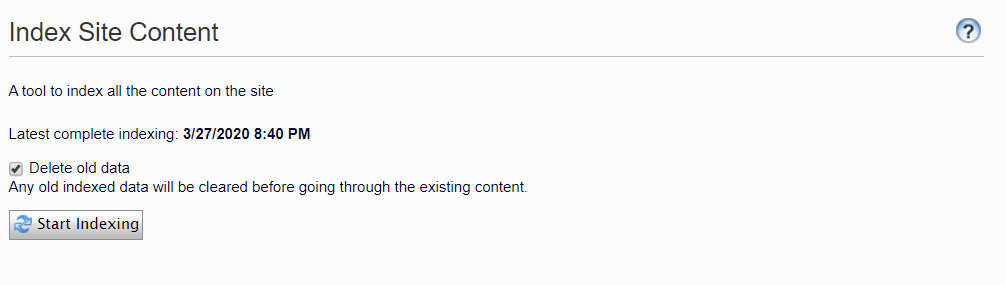
Clicking on the “Start Indexing” button will create index files under your App_data/Index/Main folder.
if you see below error when trying to load IndexContent.aspx page
System.Security.SecurityException: Request for principal permission failed.

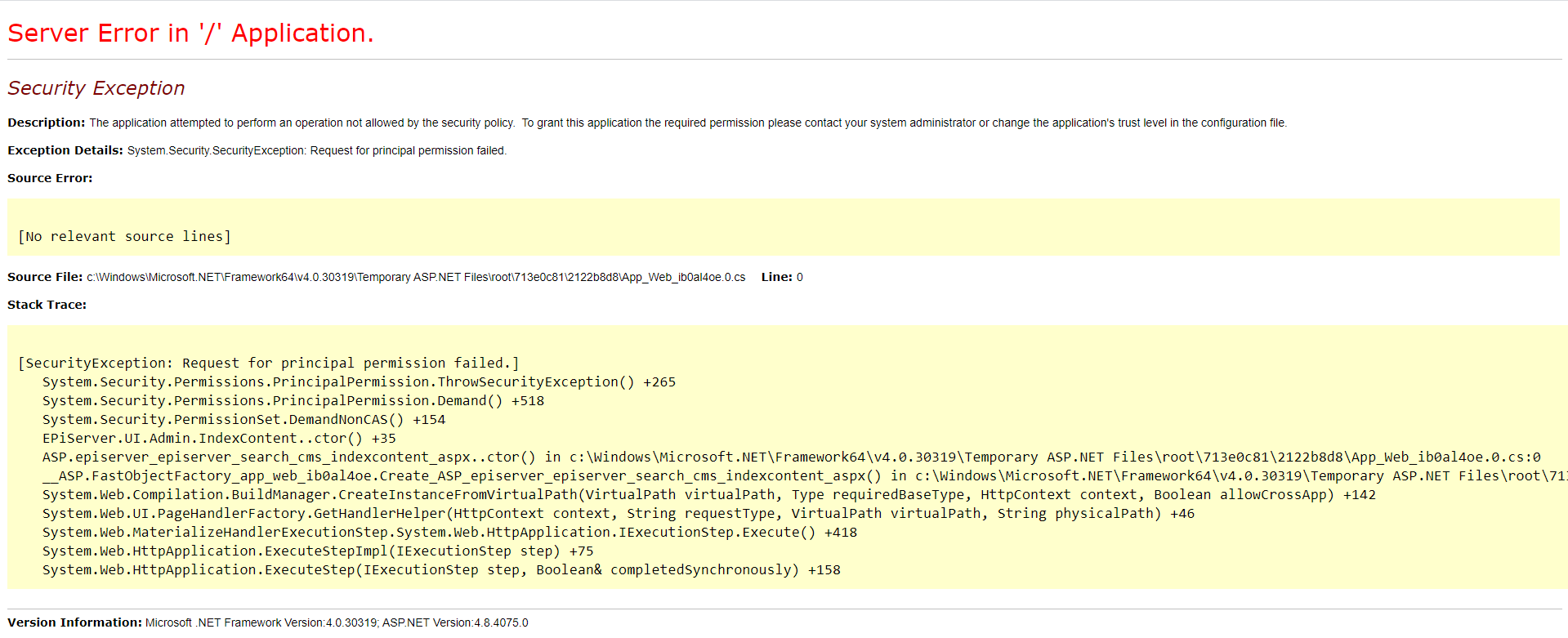
then
remove this virtual role from the Web.Config file.
<add name=”Administrators” type=”EPiServer.Security.WindowsAdministratorsRole, EPiServer.Framework” />
and add below virtual role.
<add name=”Administrators” type=”EPiServer.Security.MappedRole, EPiServer.Framework” roles=”WebAdmins,Administrators” mode=”Any” />
Tuesday, April 13, 2021
IIS - Create a from HTTP to HTTPS redirect
1. Install the url rewrite module extension below.
https://www.iis.net/downloads/microsoft/url-rewrite
2. Then add this to the web.config inside <system.webServer>
<rewrite>
<rules>
<rule name="HTTPS Redirect" stopProcessing="true">
<match url="(.*)" />
<conditions>
<add input="{HTTPS}" pattern="^OFF$" />
</conditions>
<action type="Redirect" url="https://{HTTP_HOST}/{R:1}"
appendQueryString="false" redirectType="Permanent" />
</rule>
</rules>
</rewrite>
Make sure you have https bindings set and that the firewall accepts incoming on 80 and 443.
Friday, April 9, 2021
500 Error - Config to see more info
<system.webServer>
<httpErrors errorMode="Detailed" xdt:Transform="Replace" >
</httpErrors>
<asp scriptErrorSentToBrowser="true" xdt:Transform="Insert" />
Wednesday, April 7, 2021

Subscribe to:
Posts (Atom)